🛂 Entry & Visa
How to Submit Your Arrival Card to China Online
A complete step-by-step guide with screenshots. Fill in the form online before you fly — skip the paper arrival card.
Official NIA Video Tutorial
Watch the official video walkthrough from the National Immigration Administration:
▶ Watch Tutorial VideoStep 0: Access the Portal
Open s.nia.gov.cn and switch to English using the Language dropdown in the top-right corner.

After switching to English, click Entry Declaration to begin
Two options are available:
- Entry Declaration — for most foreign travelers entering China
- Entry Declaration for Border Area Residents — only for residents from 7 neighboring countries (DPRK, Mongolia, Pakistan, Nepal, Myanmar, Laos, Vietnam)
Step 1: Read the Instructions
After clicking "Entry Declaration", you'll see the Instructions page listing who is exempt.
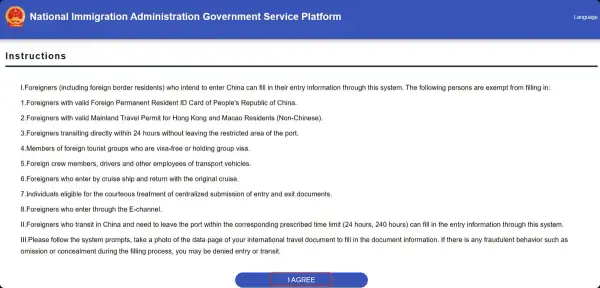
Read the instructions, then click I AGREE to proceed
Who is EXEMPT (does not need to fill this form):
- Holders of valid Foreign Permanent Resident ID Card of China
- Holders of valid Mainland Travel Permit for Hong Kong/Macao Residents (Non-Chinese)
- 24-hour direct transit passengers staying within port limits
- Group visa or group tourist members
- Crew members (airline, ship, driver)
- Cruise passengers returning on the same ship
- Persons eligible for centralized document inspection
- E-Channel entrants
Click I AGREE to continue.
Step 2: Upload Your Passport Info Page
Select your document type and upload a clear photo of your passport data page. The system will use OCR to automatically read your information.
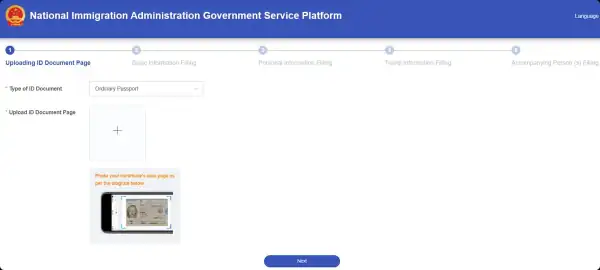
Select document type and upload or take a photo of your passport data page
Step 3: Basic Information Filling
This is the main information page. The system will automatically extract most of your details from the passport photo you uploaded.
Empty form — all fields shown
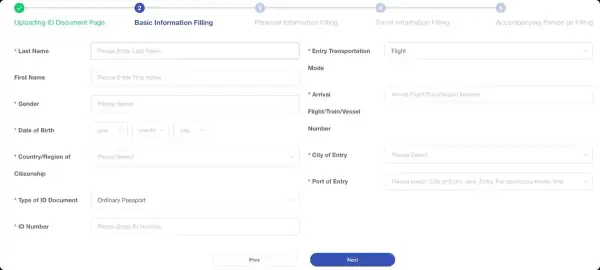
This is what the form looks like when you first enter this step
🔶 Left Section — Auto-filled by OCR (check accuracy)
Right Section — You need to fill these
Filled form example
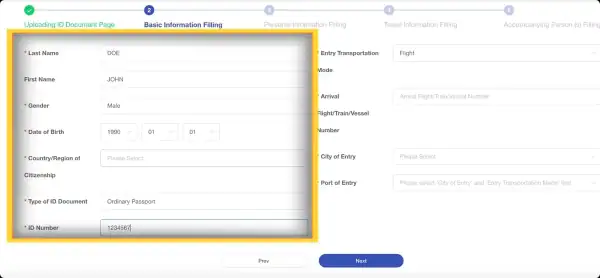
The left section (yellow highlight area) shows data extracted from your passport — double-check everything. Only Country/Region needs to be manually selected. Fill the right section with your entry details.
Step 4: Personal Information Filling
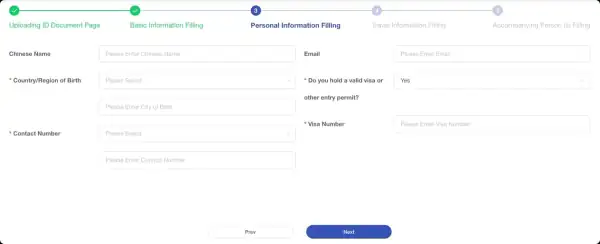
Fill in your personal details. Fields with explanations below.
Field-by-field guide:
Visa / Entry Policy Section
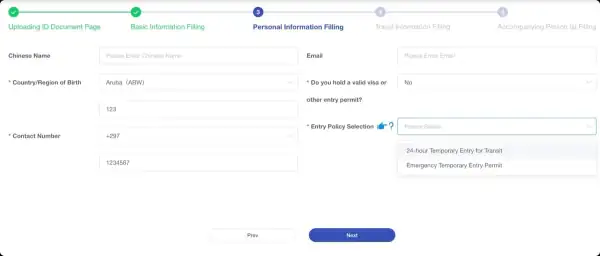
Select "No" if entering visa-free, then choose your entry policy from the dropdown
How to fill the visa question:
- Yes — if you have obtained a Chinese visa (e.g., L tourist visa)
- No — if you are entering via a visa-free policy (e.g., 240-hour transit, 30-day visa-free, Hainan visa-free, etc.)
Step 5: Travel Information Filling
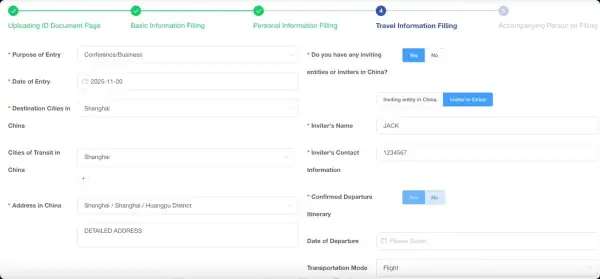
Fill in your travel itinerary details
Left Section — Trip Details
Right Section — Inviter & Return Info
- Yes — fill in inviter's name and contact information
- No — skip this section
- Date of Departure — your planned exit date
- Transportation Mode for Departure — Air / Land / Sea
- Departure Flight/Train/Vessel Number — the specific number
- City of Departure — the city you will depart from
- Port of Departure — auto-populates after city & transport are selected
Companion Prompt
After filling in Step 5 and clicking "Next", you will see this popup asking about companions:

"Do you have any companions?" — choose Yes to add travel companions
Options:
Final Step: Review, Sign & Submit
After completing all steps, you will reach the review page. Read through all your information carefully.
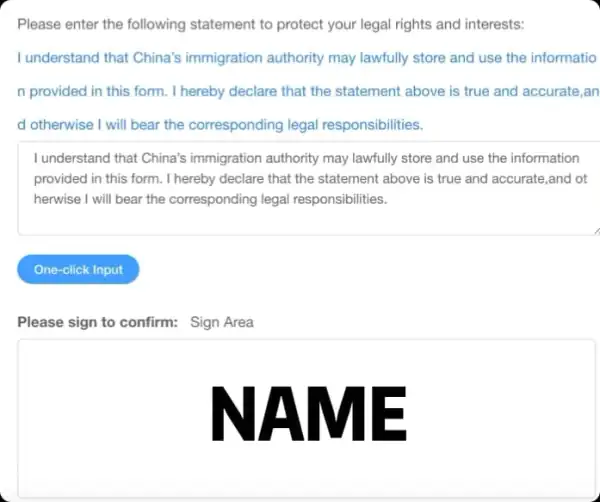
Sign to confirm, then submit. Save the QR code that appears after submission.
What to do:
- Review — Double-check all information. Use "Previous" to go back and make corrections if needed.
- Sign — Sign your name in the signature box to confirm the declaration.
- Submit — Click the submit button.
- Save your QR Code — After submission, a confirmation QR code will be displayed. Take a screenshot or save it — you must present this at immigration when you arrive in China.
Before You Start
Have these ready before filling the form:
- Your passport (physical or a clear photo of the data page)
- Flight / train / ship number for your entry to China
- Hotel name and detailed address in China (if known)
- Your phone number (with country code if not a Chinese number)
- Your email address
- A device with a camera to photograph your passport, or a scanned passport copy ready on your device
FAQ
Q: Can I fill this on my phone?
Yes, the portal is fully mobile-responsive and works on both desktop and mobile browsers.
Q: Do I need to print the QR code?
Screen it on your phone or print it out — either works. The key is to have it ready to show at immigration.
Q: What if I make a mistake after submitting?
Re-access the portal and submit a new form. The old submission will be replaced.
Q: Is this form mandatory? Do I still need the paper card?
As of 2025-2026, the online form is the recommended option. Some ports may still distribute paper cards as a backup. It's smart to fill the online form and carry a pen just in case.
Q: I'm transiting for less than 24 hours and not leaving the airport — do I need this?
No. 24-hour direct transit passengers who stay within the port restricted area are exempt.
Q: I'm entering under 240-hour transit visa-free. Do I need this form?
Yes, if you are leaving the port area. Transit passengers staying in China for up to 240 hours must fill this form.
Q: Can I reuse my info for future trips?
Yes! Within one year, the system lets you reuse previously filled data. You'll only need to update your travel itinerary for the new trip.